
Hyphoon user guide
Monitor every tire with confidence.
Hyphoon works with compatible Bluetooth Low Energy tire-pressure sensors. It shows live pressure, temperature, sensor battery status, alerts, history, and multiple vehicles on iPhone and Android.
Safety comes first
Hyphoon is an assistance tool. Stop in a safe place before changing settings or inspecting a tire. Recommended pressure must come from the vehicle placard, vehicle manual, or tire manufacturer—not from the app. Trend analysis never replaces a cold-tire measurement or professional inspection.
Start here
Quick start
- 01
Install the app
Download Hyphoon, turn on Bluetooth, and allow the requested Bluetooth and notification permissions.
- 02
Create a vehicle
Choose a built-in layout or create a custom layout, then name the vehicle and its tire positions.
- 03
Bind the sensors
Scan each sensor QR code, scan for nearby compatible BLE sensors, or enter its sensor ID manually.
- 04
Set safe limits
Enter the low-pressure, high-pressure, and high-temperature limits recommended for your vehicle and tires.
- 05
Confirm live readings
Drive or wake the sensors, then make sure every assigned tire receives a current pressure and temperature reading.
- 06
Allow background monitoring
Keep Bluetooth and notifications enabled. On Android, also allow background operation and remove excessive battery restrictions.
External valve sensor
Install the sensor securely
Use these steps for a compatible screw-on sensor supplied with an anti-theft nut. Park safely, switch off the vehicle, check the actual tire pressure, and remove the valve cap before starting.
 01
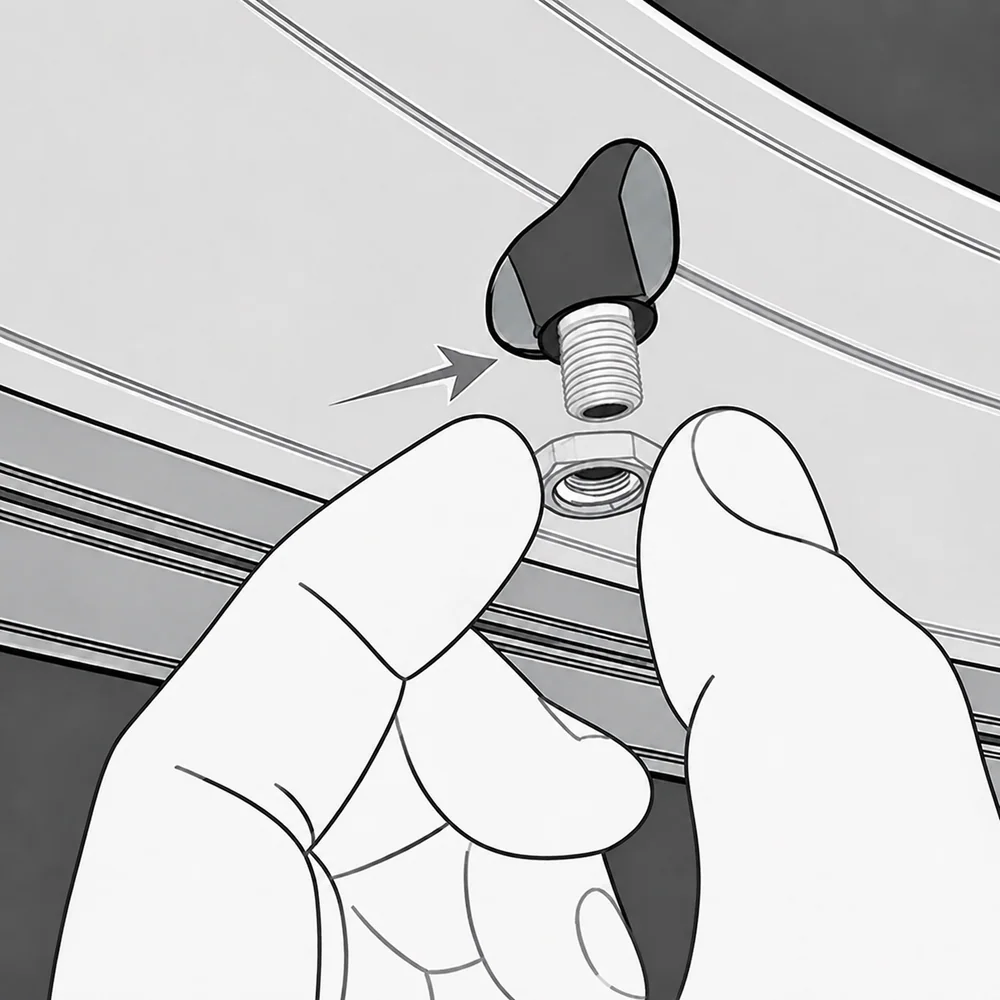
01Install the anti-theft nut
Thread the anti-theft nut onto the tire valve and turn it down the valve stem, leaving room for the sensor.
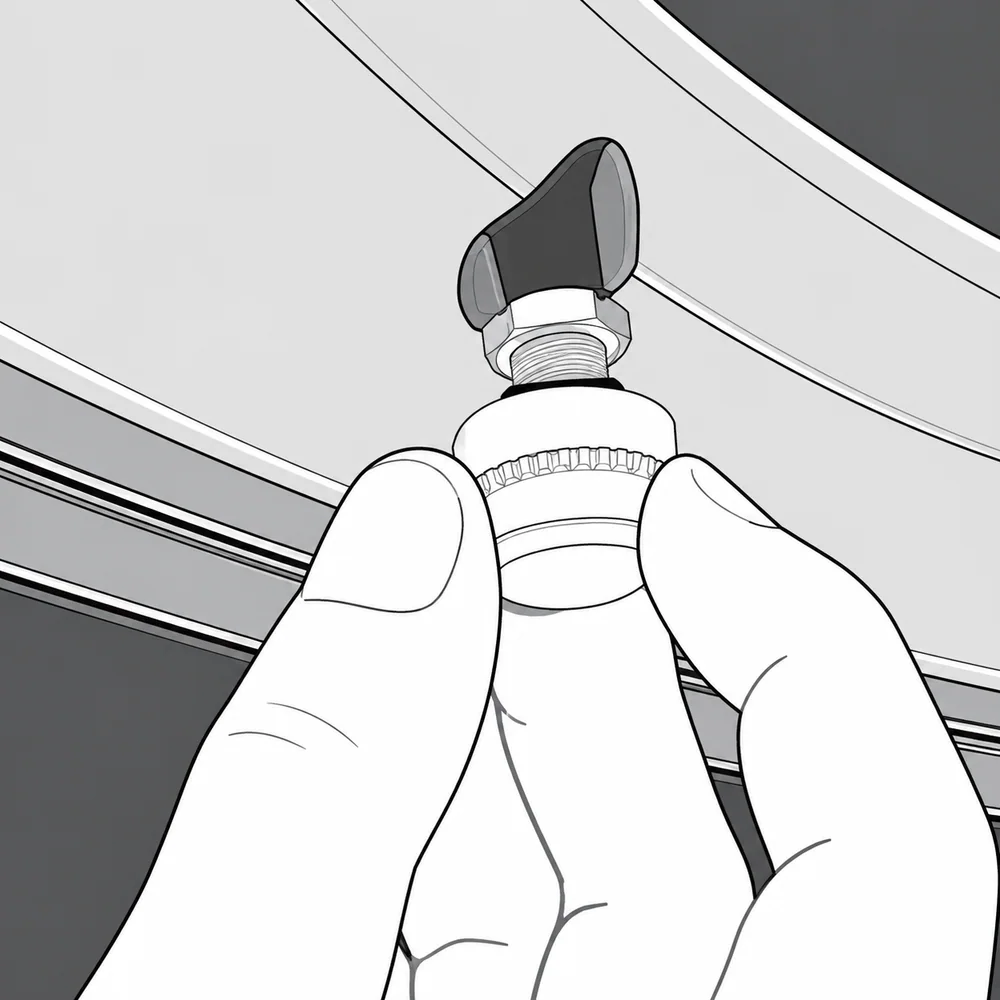 02
02Screw on the sensor
Turn the sensor clockwise onto the tire valve by hand until it is firmly seated. Keep it straight and do not force the threads.
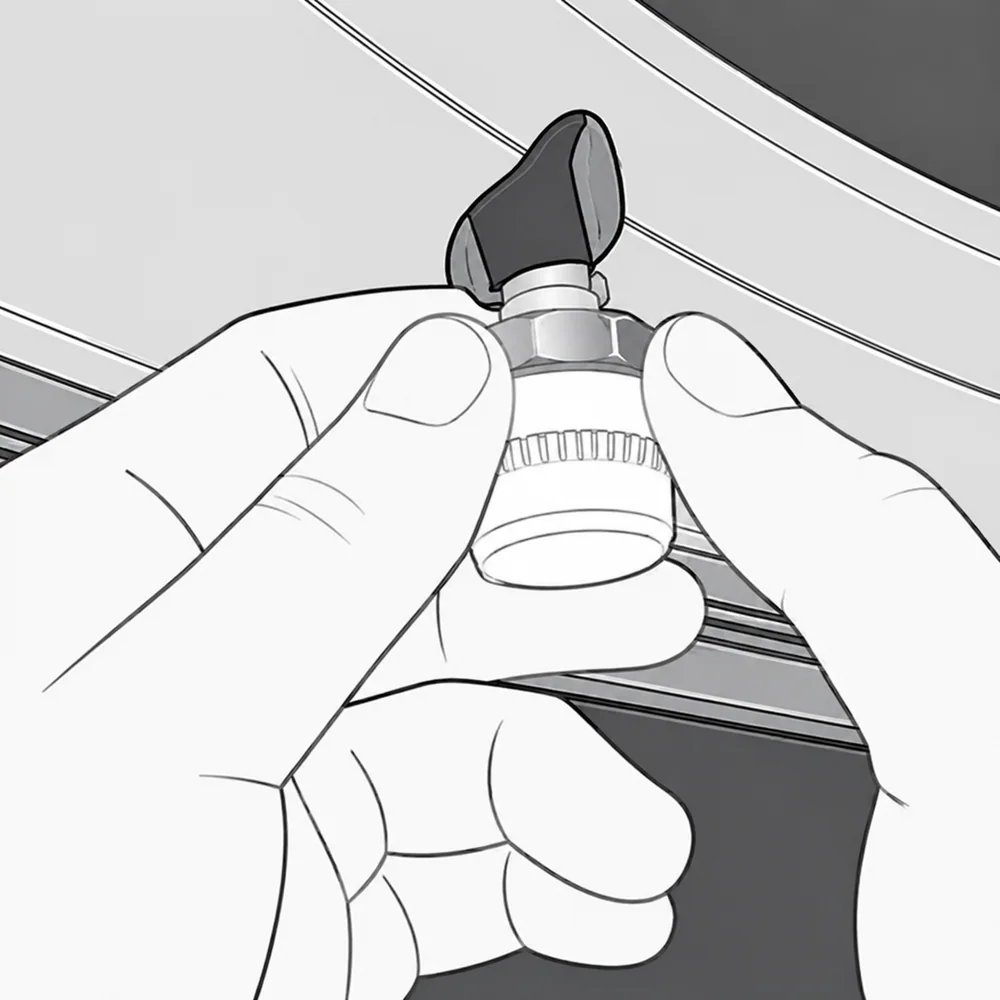 03
03Bring the nut to the sensor
Turn the anti-theft nut back toward the sensor until the nut rests against the bottom of the sensor.
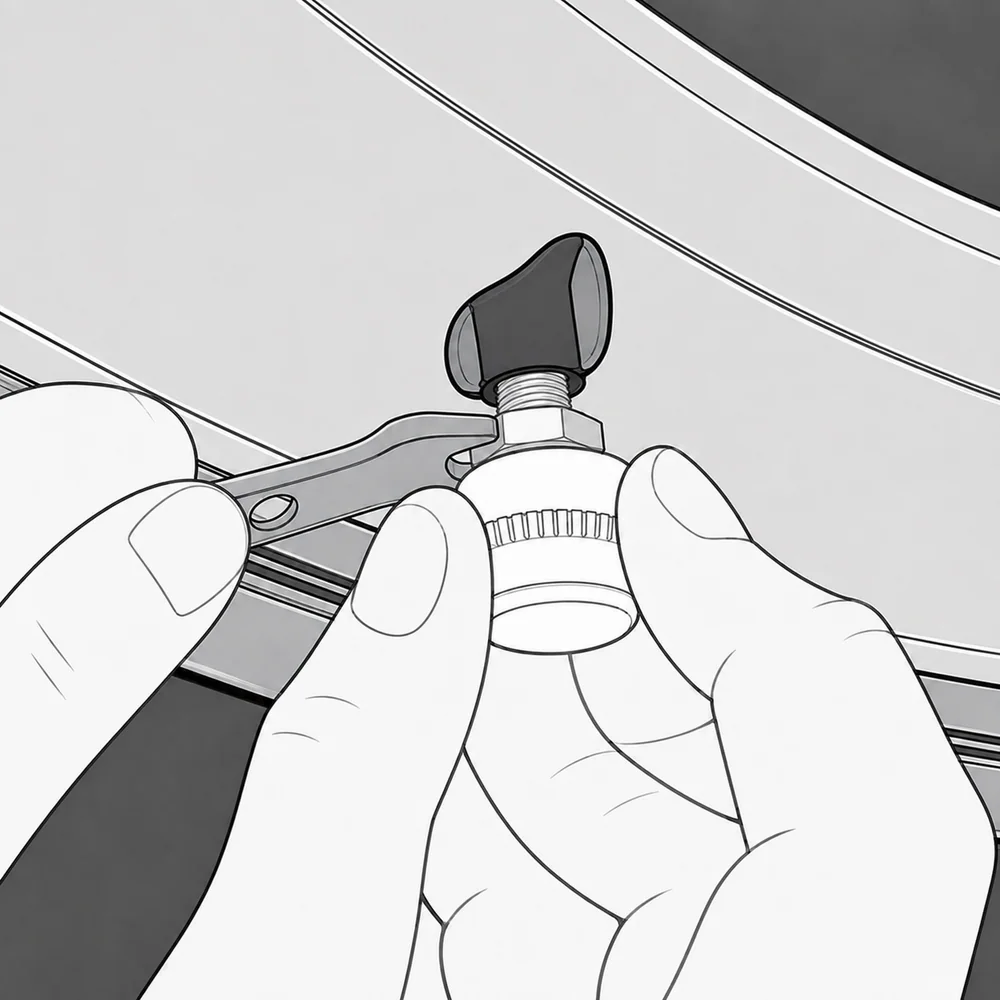 04
04Lock the sensor in place
Hold the sensor steady, then use the supplied wrench to tighten the anti-theft nut against it.
Status
Understanding the readings
Current
A recent broadcast has been received from the sensor.
Old data
The last valid reading is retained, but no recent broadcast has arrived. Do not treat it as a current normal reading.
No data yet
The assigned sensor has not provided its first valid reading.
Live tire monitoring
The home screen shows pressure, temperature, sensor battery voltage or low-battery status, the last received time, and data freshness for every tire position.
Choose the standard card view or dashboard view. Pressure can be displayed in PSI, Bar, or kPa, and temperature in °C or °F.
- The last valid reading remains visible when reception is temporarily interrupted and is clearly marked as old.
- A tire that has never produced a reading is shown differently from one with stored readings that are temporarily stale.
- Spare tires keep their own sensor, readings, history, and alerts.
Three-level safety alerts
Hyphoon classifies abnormal conditions by urgency. Level 1 calls for attention, such as a possible slow leak or low sensor battery. Level 2 recommends prompt inspection for low pressure, high pressure, or high temperature. Level 3 recommends slowing down and stopping safely for a rapid leak, severe pressure abnormality, or extreme heat.
- Alerts can use system notifications, vibration, three distinct sounds, localized voice warnings, or sound and voice together.
- While a condition continues, Level 3 repeats about every 2 minutes, Level 2 every 5 minutes, and Level 1 every 20 minutes.
- Mute one tire for 15 minutes, 1 hour, or until it returns to normal. Normal readings automatically resolve the event.
- An audio queue prevents warnings from talking over one another when several sensors are abnormal.
- Low sensor battery is maintained as a separate service reminder and is not misclassified as a pressure event.
Background monitoring
The app can continue receiving compatible BLE sensor broadcasts while it is in the background. Android uses a foreground monitoring service; iOS uses Bluetooth background capability and local notifications. Reopening the app synchronizes the latest saved readings and history samples.
Vehicles and tire layouts
Create multiple independent vehicle profiles. Each vehicle can have its own name, sensor assignments, alert limits, history, and parking location.
Built-in layouts include bicycle, motorcycle, delta trike, tadpole trike, passenger car, and custom vehicle.
- Custom layouts support up to 6 rows and 12 road tires, ordered from front to rear.
- Each row can contain one center tire, one tire on each side, or dual tires on both sides.
- Add a separate spare tire without counting it as a road position.
- Rename vehicles and tire positions, and swap two sensor assignments after tire rotation without deleting the vehicle.
- Layouts can cover passenger cars, motorcycles, bicycles, trikes, trailers, motorhomes, light commercial vehicles, and some multi-axle vehicles.
Bind and maintain sensors
Open a physical tire position and assign its compatible sensor by scanning the sensor QR code, scanning for nearby BLE sensors, or entering the sensor ID manually.
- The same sensor cannot be assigned to more than one tire position.
- Unbind or replace one sensor without affecting the other positions.
- Use the swap function after tire rotation so the bindings follow the physical tires.
Configure alert limits
Set global default limits or override them for an individual vehicle. Low-pressure, high-pressure, and high-temperature thresholds are configured separately, including high-pressure ranges used by trailers, motorhomes, and some light commercial tires.
History and trends
Each tire position stores about 14 days of detailed readings. Review pressure, temperature, time, and sensor-status changes. The activity page records pressure alerts, tire events, sensor assignments, and app-status changes, with filters for vehicle, event type, and date.
- Repeated warnings are grouped into one event and marked resolved after the tire returns to normal.
- A 7-day summary compares pressure converted to a 20°C reference value.
- The trend can be stable, slightly decreasing, possible slow leak, or still collecting data.
- The app shows data coverage and confidence and does not diagnose a slow leak when there is not enough data.
Export data
Export today, the last 7 days, the last 14 days, or a custom date range in CSV or JSON format. Export the current vehicle, all vehicles, or one tire position from its reading history. Android and iOS can save the file or open the system share sheet.
Android Auto and CarPlay
Android Auto can show all tire positions for the current vehicle, pressure, temperature, status, freshness, sensor ID, battery information, and 20°C reference pressure. You can switch vehicles and acknowledge or temporarily mute an active alert. Configure vehicles and sensors on the phone while safely parked.
CarPlay can show the current vehicle, tire status, pressure, temperature, update time, stale-data status, and allowed tire-pressure notifications, with vehicle switching.
Home-screen widgets
Android and iOS widgets show the current vehicle status, key tire pressures, and alert state. Alert colors follow their severity; stale readings use a subdued style and never appear as a current normal reading. Tap the widget to open that vehicle.
Widgets follow the app language, units, vehicle name, and tire-position names.
Parking location
Save a parking location manually for each vehicle. The app reads location once only when you tap Save now, can open navigation to the saved point, and lets you delete the record for one vehicle. It does not continuously track the vehicle or the user.
Languages and privacy
Hyphoon supports English, Simplified Chinese, Traditional Chinese, Japanese, German, French, Spanish, Italian, Portuguese, Dutch, and Polish.
- No account is required, and core monitoring does not require a cloud service.
- Vehicles, sensor assignments, and history are stored on the device. Tire-pressure data is not uploaded.
- BLE monitoring and local alerts continue to work without internet access.
- Location is used only when you actively save a parking position and for Bluetooth permission requirements on some older Android versions.
Compatibility requirements
Hyphoon currently requires Android 7.0 or later, or iOS 13 or later, plus a compatible Hyphoon BLE tire-pressure sensor and a phone with Bluetooth Low Energy.
- Turn on Bluetooth and grant the necessary system permissions.
- Keep the phone within effective sensor reception range.
- On Android, allow background operation or disable excessive battery restrictions for Hyphoon when required by the phone manufacturer.
Hyphoon support
Need help?
If a sensor will not connect or a reading appears abnormal, stop safely, check the tire manually, and contact Hyphoon support with your phone model, app version, vehicle, and sensor ID.